Building a cue list
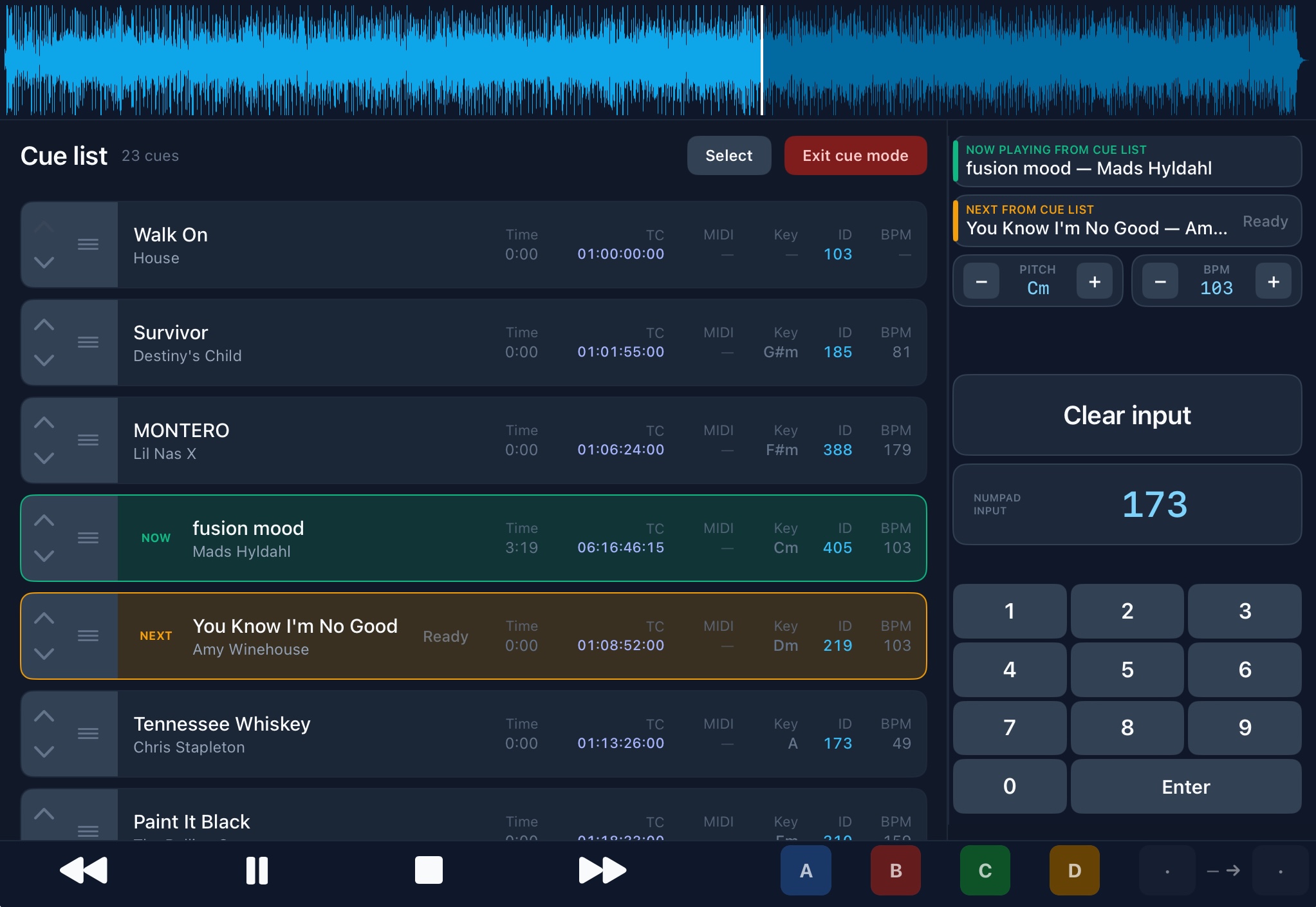
A cue list is your running order for the gig — the sequence of songs you will play, in order.
- Create a new cue list (or open an existing one).
- Add songs from your library in performance order.
- Reorder with the grip on the row if the set changes (no up/down chevrons).
- During the show, BackTrackR shows which song is NOW and which is NEXT.
Auto-advance moves to the next cue when the current song ends. Auto-play next cue (under Settings → Playback → Cue list) decides whether that advance also starts playback — off means the next song loads and stages, and you press Play yourself. Next / Prev work the same way. Under Settings → Playback & cues you can also enable Follow playback so the list scrolls with the current song.
Selected and NEXT rows show a green dog-ear top-right while staging (spinner), then a check when Ready. Optional full-screen Loading / Ready cards live under Settings → Playback → Announcements (off by default) — they show the song title while loading, then Ready when it can play.
Cue list + timecode
For SMPTE shows, context-menu a cue row → Set timecode in-point. Chase prefers cue intervals over library Follow windows, and when a chased song is on the cue list it becomes NOW with NEXT preloaded. Typical flow: Auto-allocate Follow starts → arm the first cue → let chase promote songs as TC advances. See Timecode.